
Why board scanning is useful
BoardPara1
BoardPara2
BoardPara3
BoardPara4
BoardPara5
BoardPara6
BoardPara7
Worked example
The example below shows the exact sort of workflow this tool is designed for. On the left is a photographed chess diagram with uneven lighting, textured squares, and a monochrome print style. On the right is the normalized board rendering produced after detection. This is the useful part of the pipeline: the input image is messy and human-readable, while the output is clean and machine-readable.
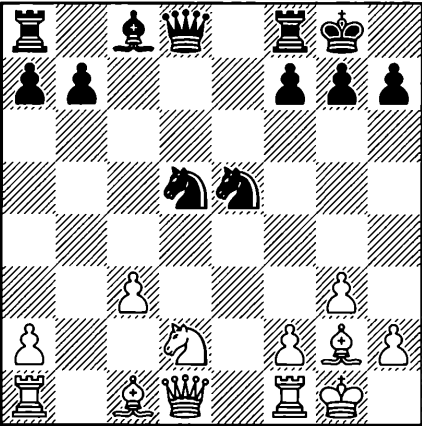
The source image contains realistic imperfections: a photographed board, printed piece shapes, and reduced contrast. This is the kind of input that is awkward to reconstruct manually but still suitable for automated board extraction.
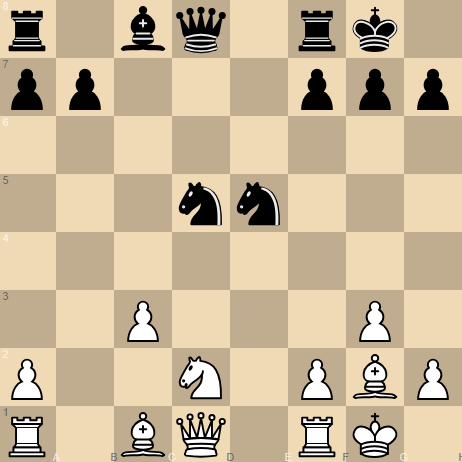
After recognition, the position is rendered as a standard digital chessboard. This cleaned output is much easier to inspect, copy into analysis tools, and convert into a FEN string for further use.
What makes this example valuable is not just that the board can be recognized, but that the result becomes immediately reusable. Once the position is normalized, the player can verify the piece placement, copy the FEN, and continue the analysis on Lichess or another engine-backed board with almost no extra setup.
In short, board scanning is useful because it removes repetitive manual work, reduces transcription mistakes, and speeds up the path from image to analysis. For anyone who works with chess positions in the real world, that is a meaningful productivity gain.